








CloudThrottle Resource Scheduling Steps
Overview:The Resource Scheduling Flow Diagram outlines the systematic approach to setting up and managing resource schedules in CloudThrottle. It highlights the steps necessary to define holiday schedules, create preset company schedules, and apply these schedules at both the account and resource levels. This structured process ensures that cloud resources are efficiently managed, reducing unnecessary costs and optimizing cloud usage. By following this flow, organizations can leverage CloudThrottle’s centralized console to maintain control over multiple cloud accounts, ensuring consistency and efficiency without the need to log into each account separately.
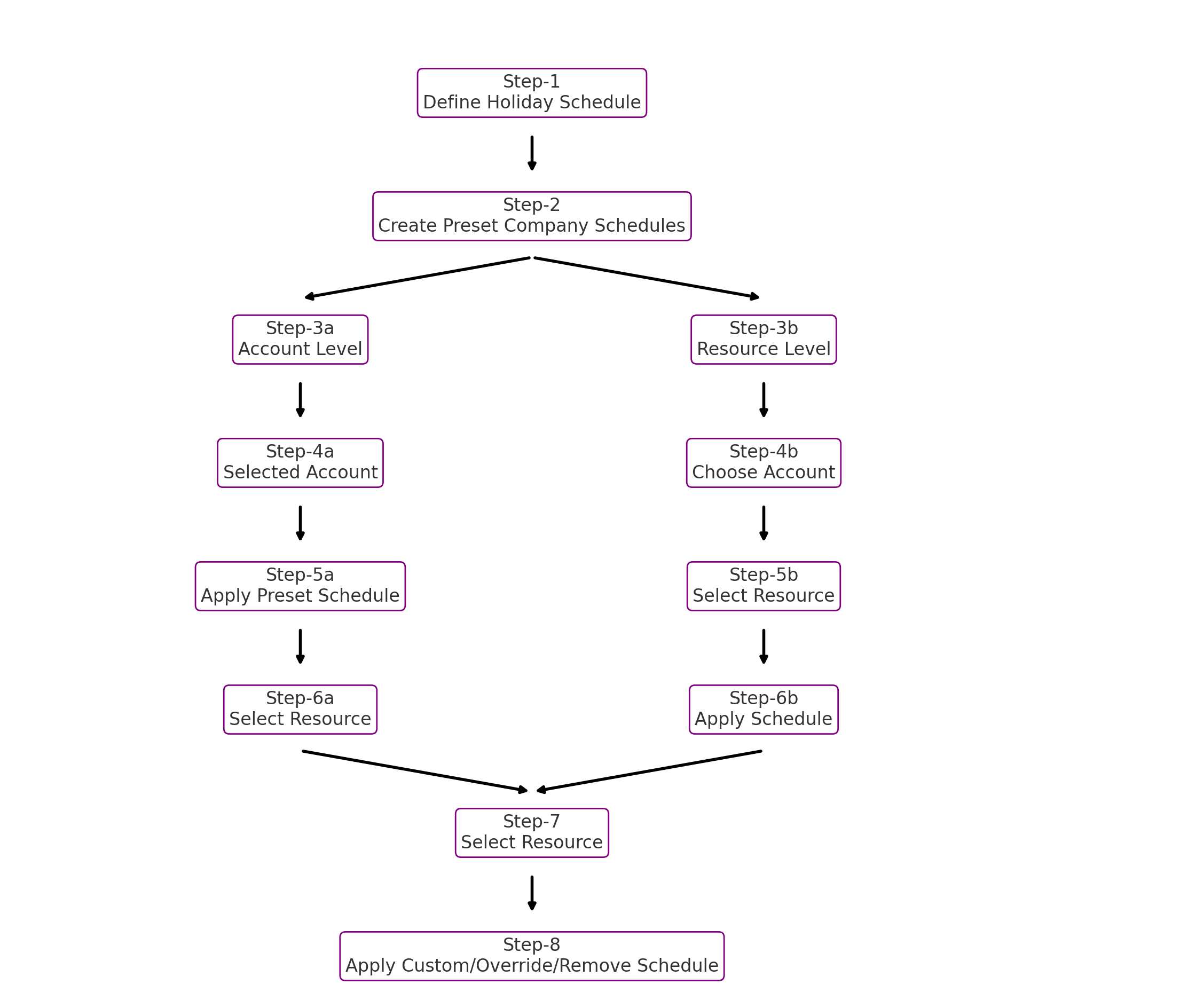
Flow Diagram Steps Explained:
Step-1: Define Holiday Schedule
Establish a list of holiday schedules specific to your company to outline periods for shutting down or limiting resource usage. This step is crucial for ensuring that resources are not running unnecessarily during holidays.
Step-2: Create Preset Company Schedules
Create predefined schedules that outline the availability of cloud resources, including when specific resources will be needed and for how long. These preset schedules serve as templates for standardizing resource usage across the organization.
Step-3a: Account Level Scheduling
Opt for account level scheduling if you intend to schedule all resources in a cloud account. This approach simplifies management by applying a consistent schedule across all resources within the account.
Step-3b: Resource Level Scheduling
Choose resource level scheduling if you have specific resources that require individual schedules. This approach provides flexibility for managing resources with unique requirements.
Step-4a: Selected Account
Select the account for which you want to apply the preset schedule. This step ensures that the correct account is being managed and scheduled appropriately.
Step-5a: Apply Preset Schedule
Apply the preset schedule to the selected account. This ensures that all resources within the account follow the predefined timetable, optimizing resource usage and cost management.
Step-6a: Select Resource
Select specific resources within the account that may require different scheduling from the account-wide preset schedule. This allows for finer control over individual resources.
Step-4b: Choose Account
Choose the account that contains the resources you want to schedule at the resource level. This step initiates the process of applying individualized schedules to specific resources.
Step-5b: Select Resource
Select the specific resources within the chosen account that require unique schedules. This step is critical for managing resources that do not follow the account-wide preset schedule.
Step-6b: Apply Schedule
Apply the desired schedule to the selected resources. This step finalizes the resource-level scheduling, ensuring that each resource operates according to its specific needs.
Step-7: Select Resource
After setting up initial schedules, select any resource that may need custom, override, or removal of schedules. This step allows for further refinement and adjustments.
Step-8: Apply Custom/Override/Remove Schedule
Apply custom schedules to replace any default schedules, override existing schedules for specific periods, or remove schedules to revert resources to a 24/7 running state. This step provides the flexibility to manage resources dynamically based on changing requirements.
This article provides a comprehensive overview of CloudThrottle's Resource Schedule Concept, emphasizing its role in optimizing cloud costs and minimizing waste. It details the cloud resource scheduler's capabilities, including account-level and resource-level scheduling, and the importance of preset and holiday schedules. The article further explains CloudThrottle's Schedule Categories—Standard, Custom, Override, and Remove Schedules—highlighting their definitions, uses, and benefits. By leveraging these scheduling options, organizations can achieve efficient resource management and significant cost savings.